How to Register and Log In to Beekeeping Diary — the Email Verification Step Nobody Should Skip
Why This Guide Exists
Every week, dozens of beekeepers create a free account at beekeeping-diary.eu — and a surprising number of them never actually get in. Not because the platform is broken, and not because their registration failed. Because of one small, easily missed step: they never click the confirmation link in the verification email.
The result is always the same. They type their username and password, press "Login", and see the message that their email address isn't verified yet. Some assume the site is broken. Some give up. Some write to us weeks later asking why their account disappeared. The fix, in almost every case, takes less than a minute — and it's sitting unopened in a spam folder.
So we decided to write the guide we keep sending by email, once, properly. Here is exactly how registration works at Beekeeping Diary, how to log in, what happens behind the scenes if your email stays unconfirmed, and — since you're here — how to install the Android app on your phone, because that has its own small set of Google-imposed hoops to jump through.
What a Free Account Actually Gives You
Before the mechanics, a quick word about what you're registering for. Beekeeping Diary is an online hive journal built by beekeepers, for beekeepers: apiaries, hives and frames, inspections, feedings, treatments, harvests, queen events and weather — all in one searchable record instead of scattered notebooks. New accounts start with a 45-day trial of the full feature set, then continue on the free plan (up to 3 apiaries, 10 hives each) for as long as you like.
- A permanent, searchable history of every hive you manage — the thing paper notebooks never quite deliver.
- Frame-by-frame records and photo documentation, with a frame visualization that shows the state of each hive at a glance.
- AI-powered hive analysis — our BeeAI assistant reads your inspection logs and returns a health score and short- and long-term plans for each individual hive.
- Free printables — the Beekeeping Calendar 2026 and the Varroa Treatment Checklist can be downloaded from the "Support the development of Beekeeping Diary" section of your dashboard.
In other words: the account is free, useful from day one, and the only thing standing between you and it is one click on one email link.

ApiaryPro Automated Bee Hive Kit — Sensor-Smart Beekeeping
- ✅ Sensors feed weight and temperature data straight to your records
- ✅ Remote monitoring that pairs perfectly with a digital diary
- ✅ Durable construction built for years of apiary work
A hive that logs itself — then verify everything in your Beekeeping Diary account.
View on ApiaryPro →How to Register — Step by Step
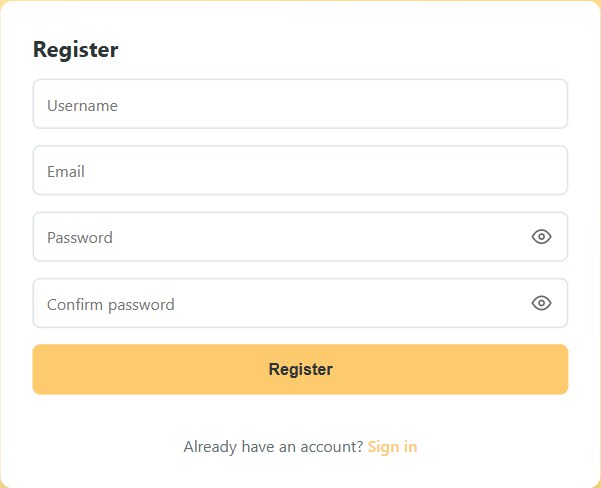
Registration takes under two minutes. Open beekeeping-diary.eu and click the "Register" link under the login form. You'll see four fields and one button:
- Username — at least 3 characters. This is what you'll type every time you log in, so keep it short and memorable. It must be unique; if someone already took it, the form will tell you.
- Email address — this is the single most important field on the page, and the one where typos do the damage. Type it carefully, because the verification link is sent to exactly what you type. One wrong letter and the link flies off to an address that doesn't exist — and you wait forever for an email that never comes.
- Password — at least 6 characters. The eye icon on the right of the field toggles between hidden and visible text, which is handy for checking the password as you type it.
- Confirm password — the same password again. The form won't submit until the two match.
Press "Register". The form validates everything in the browser first — minimum lengths, a properly formatted email, matching passwords — and then sends it to the server. The server checks its own rules too: a username or email that already exists in the system will be rejected with a clear message, and a password under 6 characters never leaves the form.
One detail worth knowing: if the verification email cannot be sent at all (say, the address really doesn't exist), the system doesn't leave a half-created account behind — the registration is canceled automatically. So you'll never register "successfully" with an email that can never be confirmed.
The Verification Email — the Step Everyone Skips
Right after a successful registration, an email arrives from Beekeeping Diary with a confirmation link. Clicking that link is what turns your freshly created account into a real, usable one. Until then, the account sits in a special state: registered, but unverified.
Why do we require this? Because email verification is what keeps your account recoverable and the platform clean. It proves the address is yours, it lets us reach you with genuinely important messages (account notices, security, service updates), and it stops bot registrations from polluting the database. It's a standard practice — and at Beekeeping Diary it's enforced strictly, in both directions: you can't use the account until you confirm, and accounts that are never confirmed don't linger forever.
Practical advice for the confirmation email:
- Check the spam folder. This is where a large share of "I never got the email" cases turn out to be hiding. The message is sent from info@beekeeping-diary.eu — marking it "not spam" also helps future messages through.
- Add info@beekeeping-diary.eu to your contacts. One minute now, no missed emails later.
- Click the link soon. The confirmation link is valid for 11 days after registration. After that it expires, and the simplest path is to simply register again.
- Tapped the link? You're done. The moment you open it, your email is confirmed, your account becomes fully active, and you can log in immediately.
How to Log In
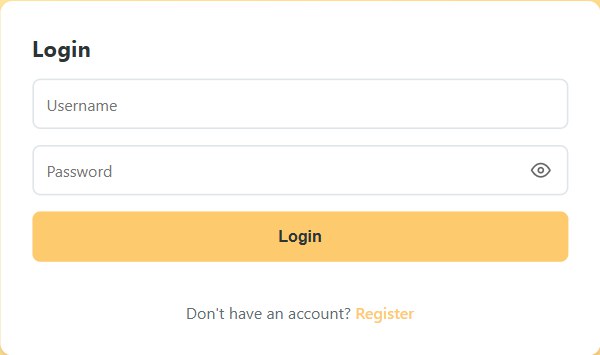
Logging in is the simple part. Open beekeeping-diary.eu, enter the username and password you chose, and press "Login". If you're already logged in from a previous session, the site recognizes you and takes you straight to the dashboard.
Three small things worth knowing:
- The eye icon works here too — click it to check your password before submitting, especially on a phone where autocorrect loves to sabotage logins.
- The whole interface is bilingual. The language switcher (BG/EN) in the top-right corner of the homepage switches the entire site between Bulgarian and English — and the same toggle exists inside the app.
- The first login shows the Terms of Use. Because your data — apiary records, photos, locations — is protected under GDPR, the app asks you to read and accept the terms before you start working. Tick the checkbox, press "Accept", and you won't see it again.
Once you're in, the dashboard greets you by username, shows your plan (trial, free or a paid plan) with the days remaining, and opens the door to everything: apiaries, hives, inspections, the AI assistant, the free printable downloads, and your profile settings — including username and password changes, which live in the Profile section of the dashboard.
What Happens If You Never Confirm Your Email
This is the part most of those stuck users never hear about, so here it is in full transparency — exactly how the system treats unverified accounts, and why.
- Until you confirm, you cannot log in. Period. Even with the correct username and password, the login is refused with a clear message: your email address must be verified first. The account exists, the trial clock may be running, but the door stays locked until the link is clicked.
- After about 5 days, you get a reminder. The system tracks registrations whose emails haven't been confirmed. Around the fifth day, a reminder email goes out: your account was created X days ago, here is your confirmation link again, please confirm it. If that email lands in spam or was sent to a mistyped address, it obviously can't help — which is why the first advice in this article is to check the spam folder early.
- Around day 10, the account is permanently deleted. Unverified accounts are cleaned up as part of routine maintenance: the database is checked for registrations that were never confirmed, and by roughly the tenth day those accounts — empty of any data, since they were never used — are removed, with a courtesy email explaining that the account was deleted because the email was never confirmed. This is deliberate hygiene, not a punishment: dead accounts with unreachable addresses serve nobody, keep the user database inaccurate, and the verification links expire after 11 days anyway.
The good news: deleting an unverified account destroys nothing of value. An account that never logged in contains no apiaries, no hives, no records — just a username, a hashed password and a waiting email link. And re-registering afterwards is completely fine: you can use the same email address (and even the same username, once the old record is gone) and start fresh. The new registration generates a new confirmation link, and the cycle works exactly as described above — check the email, click the link, you're in.
So if you registered a while ago, never confirmed, and today your login says the account doesn't exist — that's not a bug and nothing was lost. Register again, confirm within the window, and keep the account active by simply using it.
One more behind-the-scenes note for the curious: those administrative checks — who hasn't confirmed, when the reminder went out, which accounts are ready for cleanup — are exactly the kind of routine user maintenance that runs on the platform's admin side. They exist to keep the service tidy and the communication honest, and they are the reason a forgotten registration never turns into a mysterious "ghost account" years later.
The Android App: Downloading and Installing the APK

Beekeeping Diary works beautifully in any mobile browser, but we also ship a native Android app as a direct APK download — the green "📱 Download APK" button right under the login form. On Android devices the button even pulses gently, so you don't miss it.
Why an APK and not Google Play? Publishing on the Play Store carries restrictions and review requirements for smaller independent apps — and until the app is listed there, the APK is the official, direct-from-the-developer way to install it. The file is served straight from our own domain, beekeeping-diary.eu, so you always know its origin.
Because the file doesn't come from the Play Store, Android will ask you once to allow it — Google calls installs from outside the Play Store "installing from unknown sources". It sounds scarier than it is; you are simply telling your phone that you trust this one website. Here is the process on most Android phones:
- Open beekeeping-diary.eu in Chrome on your Android phone and tap 📱 Download APK. The file downloads like any other.
- Tap the downloaded file (in the notification or in Chrome's Downloads). Android will show a blocked message: "For your security, your phone is not allowed to install unknown apps from this source."
- Allow installs from Chrome once. The dialog has a direct link to the right setting: Settings → Apps → Special access → Install unknown apps → Chrome → Allow from this source. (On Samsung phones the path is similar: Settings → Apps → Menu → Special access → Install unknown apps.) Flip the switch, go back, tap the APK again.
- Confirm the Play Protect warning. Because the app is new and not yet known to Google, Play Protect may show "Unsafe app blocked" or "Unknown developer". Tap More details → Install anyway. This warning appears for every app that isn't on the Play Store — it is Google being cautious, not a detected problem.
- Open the app and log in with your username and password — the same account you use on the website.
A short safety note, because it deserves one: the "unknown sources" permission is exactly what malicious apps exploit — so apply it only for files you deliberately downloaded from a site you trust. Our APK lives only at beekeeping-diary.eu/beekeeping-diary.apk; don't install "Beekeeping Diary" from anywhere else, and you can turn the permission back off after installing.
On iPhone and iPad there's no equivalent of the APK route — Apple doesn't allow it — so iOS users should simply open beekeeping-diary.eu in Safari and use "Add to Home Screen" for an app-like experience. The web app is fully functional on any device.
If you're building out your field kit alongside the digital diary, a couple of tools our readers pair with it: a paper apiary inspection journal for quick glove-friendly notes, and a beekeeping starter kit for new beekeepers setting up their first hives.
Troubleshooting: Every Error Message, Decoded
Here are the exact situations the login and registration forms can produce, and what each one means:
| What you see | What it means | What to do |
|---|---|---|
| "Username or email already exists" | Someone (possibly you, earlier) registered with that username or email. | Try logging in with it — if it's yours and verified, you're done. Otherwise choose a different username/email. |
| "Password must be at least 6 characters" | Too-short password. | Use 6+ characters. Longer with mixed characters is better. |
| "Please verify your email address before logging in" | Correct credentials, but the confirmation link was never clicked. | Find the verification email (check spam!), click the link, log in again. |
| "Invalid username or password" | Wrong credentials. | Check spelling and the eye icon. If truly forgotten, write to info@beekeeping-diary.eu. |
| "Verification token has expired" | The link is older than 11 days, or the account was already cleaned up. | Register again — the new registration comes with a fresh link. |
From First Login to a Full Apiary Record
Once you're verified and inside, the real value starts. Add your first apiary, then your hives, and begin logging inspections — every opened hive, every finding, every feeding and treatment. The data accumulates into the thing every experienced beekeeper wishes they had: years of comparable, searchable history per colony. From there the app does what paper can't: it shows you trends, reminds you what needs doing, and lets the AI assistant turn raw logs into per-hive health assessments.
To see the full picture of what the platform does with your records, browse our roundup of the best beekeeping apps, compare the leading platforms in our best beekeeping software roundup, and grab the free Beekeeping Calendar 2026 + Varroa Checklist printables from the "Support the development" section of your dashboard. And if you're choosing or evaluating an apiary site, our companion tool beehive-analyzer.eu analyzes any location for honey flow and suitability — see the full user guide here.
Ready to Start Your Hive Journal?
Register free at beekeeping-diary.eu, confirm the email link, and your apiary's permanent record begins today.
🐝 Register FreeFrequently Asked Questions
Why can't I log in even though I registered?
Because your email address hasn't been confirmed yet. Every registration receives a confirmation link by email — until you click it, the account stays unverified and login is blocked. Check your inbox and spam folder for the message from Beekeeping Diary and click the link.
The verification email never arrived. What should I do?
Check the spam folder first, looking for a message from info@beekeeping-diary.eu. If there's nothing anywhere, the most common cause is a typo in the email address during registration — simply register again with the correct address. If the email couldn't be delivered at all, the registration is canceled automatically, so nothing half-created is left behind.
What happens if I never confirm my email?
A reminder email goes out after about 5 days. If the email is still not confirmed by around day 10, the account is permanently deleted — the confirmation link is only valid for 11 days anyway. Nothing of value is lost: you can register again at any time with the same email and username.
Does the verification link expire?
Yes — it's valid for 11 days after registration. After that it stops working, and the cleanest path is to register again; the new registration generates a fresh link.
How do I install the Android app?
Open beekeeping-diary.eu in Chrome on your Android phone and tap the green "Download APK" button. Allow installs from that source once (Settings → Apps → Special access → Install unknown apps → allow for Chrome), then confirm the Play Protect warning with "Install anyway". The APK is served directly from beekeeping-diary.eu — don't install it from anywhere else.
I forgot my password. Can I reset it?
While logged in, you can change your password in the Profile section of the dashboard. If you can't log in, write to info@beekeeping-diary.eu and we'll help you recover access.
One Click Between You and Your Hive Journal
The whole system — registration, verification, login, the Android app — is designed around one idea: an account you can prove is yours, protected by GDPR, that keeps working for you for years. The only price of admission is one click on one email link, within 11 days of registering. Check the spam folder, click the link, log in — and welcome to the part of beekeeping where the records finally work as hard as you do.
Register free at beekeeping-diary.eu — and if you found this guide after being locked out, you now know exactly why, and exactly what to do about it.
Register → Confirm → Log In → Start Recording
Free account, 45-day trial, free Calendar 2026 + Varroa Checklist printables inside.
🐝 Get Started Free